
Thumbnail
The size of a video is often quite large, so YouTube doesn't use videos for marketing purposes. Instead, it uses an image (picture) that provides information about the video, and this image is called a thumbnail.
YouTube allows you to upload custom thumbnails. If you don't upload a custom thumbnail, YouTube will show you three frames from the video, and you can choose one of them as the video's thumbnail. This can be done either while uploading the video or by editing the video at any time.
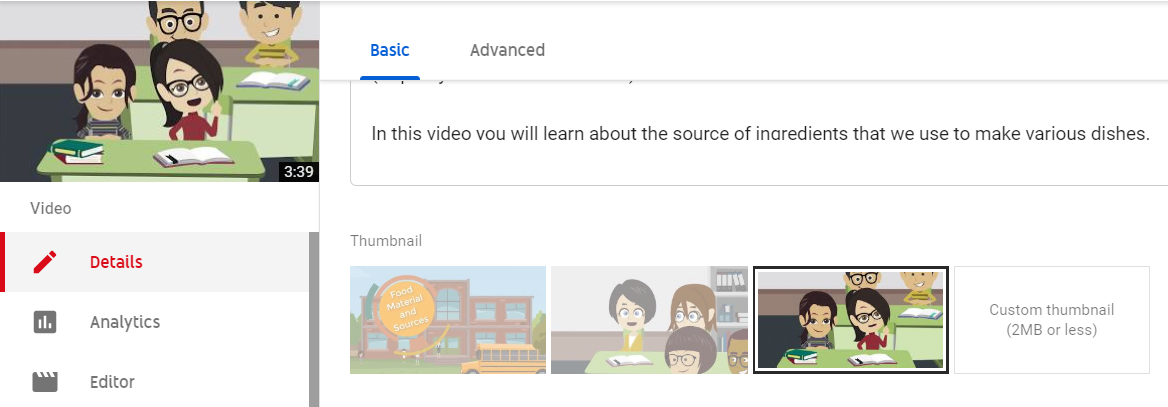
Here you can see how YouTube displays the three auto-generated thumbnail options, along with the option to upload a custom thumbnail.
Your video could be excellent, but before a student watches your video, they see its thumbnail. You should make an effort to ensure that when a student looks at your video's thumbnail, they are inclined to watch it. This can lead to an increase in your video's CTR (click-through rate).
Video Thumbnails and Watch Time
Watch time refers to how long your video is being watched.
Let's say your video's thumbnail is excellent, showing 3D graphics, and a student expects to learn something related to 3D graphics from your video. They start watching your video, but it turns out that the content doesn't match their expectations, and they stop watching after just a few seconds. This results in a lower watch time for your video, and YouTube may reduce the impressions it gets.
From the example above, you can understand the deep connection between thumbnails and watch time. Therefore, you should make an effort to ensure that the content represented in your thumbnail aligns with what your video actually offers. This way, when a student comes with certain expectations, they'll find them fulfilled, and they'll stay engaged with your video for longer.
Branding and Video Thumbnails
Branding means using consistent color combinations, backgrounds, fonts, and other elements in your content. You can choose to maintain consistent branding for all your content, or you can customize branding for different series. Your video's thumbnail can help with branding your content.
Imagine a student watching a YouTube video. YouTube displays recommended videos in a list, and your video is among them. The thumbnail of your video will have a similar look to the video being currently watched, which helps the student quickly identify that your video belongs to the same series. This can increase the chances of your video being clicked when it appears in the recommended video list.
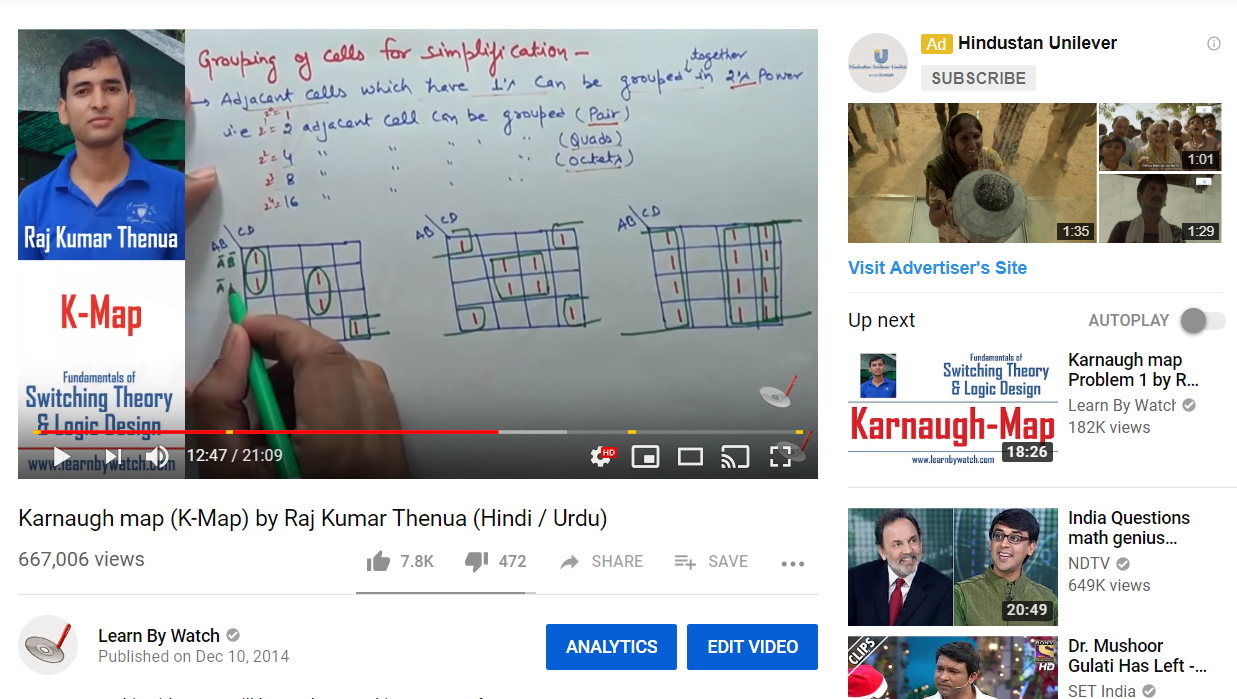
Here you can see how branding is used with the teacher's image and title to create consistency, making it clear which video in the recommended list belongs to the same series as the one the student is currently watching.
By paying attention to these aspects, you can improve your video's CTR and overall viewer engagement on YouTube.
Answers are generated by AI from this book’s content and may be imperfect — the chapters themselves are the source of truth. This is the same technology behind our AI Teaching Assistant service.