Recording Setup
For creating different types of educational videos, you need to set up various arrangements. I categorize educational videos into four different types.
Tabletop
To create videos in this style, the teacher places paper on a table and explains while writing on the paper with the help of a pen.
Creating videos in this manner is relatively easy and quick because teachers are already accustomed to teaching by writing on paper. You don't need any special training to make this type of video.
For recording tabletop videos, you can use a document camera. Document cameras are a mid-range one-time cost on Amazon. While a document camera may not be suitable for other setups, I recommend it for tabletop video recording.
I've designed a special arrangement for this purpose. I've created a tripod design that helps in capturing video of the document placed on the table.
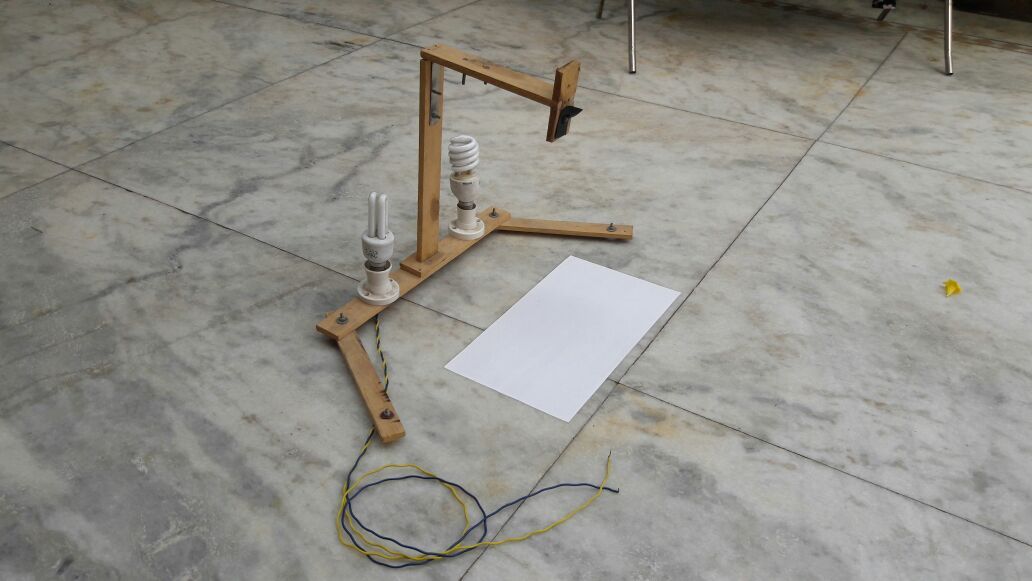
In this arrangement, there is lighting, and you can use a mobile phone or camera to record videos with paper. You can ask any carpenter to create this setup, and they can prepare it in about 1 hour.
If you want to set up this arrangement for recording your educational videos, detailed information is available at this link. However, before finalizing this setup, there may be two other setups for creating videos in a similar manner. Learn about them as well.
Desktop/Laptop for Tabletop Videos
You can also create tabletop videos using a desktop or laptop. For this, you will need software, a screen recorder, and hardware, a digital pen tablet. Let's understand both:
Screen Recorder: This is software that records your computer screen, creating a video. It records all activities on the screen, and it also provides an option for recording audio. This means you can explain while performing tasks on your computer screen, and the entire process will be recorded as a video.
Digital Pen Tablet: A digital pen tablet is a hardware device that allows you to write on your computer screen. While Wacom tablets are popular, other brands may work just as well. A digital pen tablet provides you with the right pen to write on the computer screen. You can also use software that allows writing, provided by the tablet, to create content. For example, you can use MS-Paint for drawing on the screen. However, to write on MS-Word or similar programs, you will need software that supports digital pen input.
Whenever you want to write on your computer screen using a digital pen tablet, you'll also need software that provides you with writing and erasing tools. Khan Academy, Smooth Draw, OneNote, OpenBoard, and Epic Pen are examples of software that work well with digital pen tablets. You can try using these software options with your digital pen tablet and choose the one that suits you best. They are all good and function similarly.
To create videos using a desktop or laptop, you will need two types of software and two types of hardware:
Software:
Screen Recorder: You need screen recording software. This software captures everything displayed on your computer screen and records it as a video. It often includes audio recording options, allowing you to explain your actions while recording.
Drawing Software: You'll also need drawing software. This software enables you to draw, write, or annotate on the screen during the recording. It's essential for creating educational content where you need to illustrate concepts or diagrams.
Hardware:
Desktop or Laptop: You will require a desktop computer or a laptop as the primary device for recording and running the necessary software.
Digital Pen Tablet: A digital pen tablet is a hardware device that resembles a pad or tablet. You use a digital pen on this tablet to draw or write directly onto your computer screen. It provides precision and control for creating visual content in your videos.
Before you purchase a digital pen tablet, it's important to note that using it effectively may require practice. It can be challenging to get accustomed to drawing or writing with a digital pen tablet, so make sure you explore all methods of creating tabletop videos before investing in one.
Creating Tabletop Videos with Only a Laptop/Tablet
There are laptops and tablets available in the market that allow you to write on the screen using a special pen. While there are many such devices available, I'll mention two of the best options and offer advice on which one to choose to avoid future hassles:
Microsoft Surface: Microsoft Surface is a tablet that allows you to write on its screen. Microsoft offers a dedicated pen for this tablet, which you can purchase separately.
Apple iPad 6th Gen/iPad Pro: Apple iPad is a tablet from Apple that also supports writing on the screen using a special pen called the Apple Pencil, which can be purchased separately.
Of these two options, my preference is the Apple iPad.
To create tabletop videos using this method, you will need the following hardware and software:
Hardware:
Laptop/Tablet (Microsoft Surface or Apple iPad)
Digital Pen (Microsoft Pen for Surface or Apple Pencil for iPad)
Software:
Screen Recorder
Drawing Software
If you were to ask me which of the three methods (tripod, digital pen tablet, or only laptop/tablet) is the best for recording tabletop videos, I would recommend using only a laptop or tablet. However, the choice depends on your budget and the hardware/software you already have.
Screencast Videos
A video created by recording activities happening on a computer/tablet/mobile screen is called a screencast video. Screencast videos are recorded using screen recording software and often involve the use of drawing software. While screen capture videos are commonly used for educational purposes, software tutorials, programming, web development, and internet-related content, they can also be used to create tabletop-style videos, as you saw in the previous section.
Screen Recording Software:
Although there are many screen recording software options available, my top three favorites are:
Camtasia Studio: Camtasia Studio is not just a screen recorder but also a video editor. It's an excellent choice, especially for creating educational videos. It's a one-time purchase, and once bought, you won't need to buy any other screen recording software for at least three years. If you're planning to make educational videos, this software is a must-have.
Open Broadcaster Software (OBS): OBS is free and open-source software primarily designed for broadcasting videos live on the internet. However, it also offers screen recording capabilities. While using OBS can be a bit challenging at first, it's a powerful tool once you get the hang of it. You can use OBS if you want to record videos and are willing to edit them using separate video editing software.
FlashBack Express: FlashBack Express is a premium software, but it offers screen recording options in its free version. It's user-friendly and can produce high-quality screen capture videos. If you only need to record videos without advanced editing, this software is a good choice. The pro version includes advanced video editing features.
Slidecast
One form of screen capture is known as a slide-cast because, in a slide-cast, you display slides on the screen, explain the presented topics using mouse movements, and record the entire process on the screen. To create a slide-cast, you also need to use screen recording software, as explained in the previous section.
Talking Head Videos
When a teacher explains something while looking at the camera and records themselves, such videos are called talking head videos.
Creating talking head videos is one of the most challenging tasks because it requires not only using the camera correctly but also understanding lighting well.
For this, you need to use two pieces of hardware: a camera and lighting. Let's delve into more details about both.
Camera
While various cameras are available in the market, if you don't have a camera that can record high-quality videos, you can use your mobile phone. With proper lighting, even mobile phone cameras can produce good results. However, if your channel gains more subscribers and you want to upgrade, consider purchasing a good DSLR camera.
When recording yourself, ensure that the camera remains steady. You can use a tripod to achieve this. If you're using a mobile phone, you can use a mobile bracket with a tripod.
Lighting
Creating a good talking head video is impossible without proper lighting. Regardless of whether you have a good camera, if you're aiming to create talking head videos, investing in good lighting is essential.
LED video lights are widely available at affordable prices today. I recommend purchasing this type of video light because of its excellent performance.
To create high-quality talking head videos, you must learn how to use both the camera and lighting effectively. For this, you can seek assistance from video schools and production training programs.
Answers are generated by AI from this book’s content and may be imperfect — the chapters themselves are the source of truth. This is the same technology behind our AI Teaching Assistant service.