
Moodle System Requirements in 2026: How Much Server Do You Actually Need?
How much RAM, CPU and storage does Moodle really need? A practical, India-focused guide to sizing your Moodle server by student count — and surviving exam day.

Ask "what server do I need for Moodle?" and you'll get a dozen different answers, most of them useless. Some tell you to grab the cheapest shared hosting; others hand you a spec sheet that means nothing without context. After running Moodle for institutions of every size, here's the honest version — what actually decides how much server you need, and how to size it by the number of students you have.
The short version: the specs that matter for Moodle are not the ones most hosting pages put in big letters. Let me explain why, and then give you real numbers per student band.
Why Moodle isn't a normal website
The first mistake is treating Moodle like a brochure website. It isn't. A brochure site serves static pages — the same HTML to everyone, cached, cheap to run. You can put that on shared hosting and never think about it.
Moodle is the opposite. It's a live application, and a heavy, dynamic one. Every login, every forum post, every grade lookup, and — most of all — every quiz hits the database and burns CPU and memory. When a student submits a quiz, Moodle isn't just showing a page; it's processing answers, grading, writing results, updating the gradebook. That's real work, per student, every time.
This is why the honest first rule is simple: never put Moodle on shared hosting. Shared hosting is built for low-traffic static sites, and Moodle will crawl or crash on it. What you actually want is a VPS — a virtual private server — where the RAM, CPU and storage are allocated to you and work only for your Moodle. (There's a longer conversation about VPS vs managed hosting, but that's a topic for another article — here we're focused on how much server you need.)
The number that actually matters: concurrent users
Here's the single biggest misconception I see: "I have 2,000 students, so I need a huge server."
Not necessarily. Registered users and concurrent users are completely different things. You might have 2,000 students on your Moodle, but they don't all log in at the same moment. On a normal day, only a fraction are active at once — in most institutions, somewhere around 10–15% concurrent. So those 2,000 students might mean only 200–300 people actually hitting the server at any given time.
That's the number to size for: how many users are logged in and active concurrently — not how many exist in the database. You can estimate it easily from how your courses run: how many students are enrolled in active courses, how many typically come online in a session. For most of the year, that concurrent load is very manageable.
And then there's exam day.
The exam-day spike — the thing that actually breaks servers
This is where servers die.
On a normal day, your concurrent load is spread out. But on exam day, everything changes. You schedule a quiz for, say, 10:00 AM — and at 10:00 AM, all 2,000 students hit the site in the same five minutes and click "Start quiz" at once. Suddenly your comfortable 10–15% concurrency becomes near-100%, all doing the most resource-hungry thing Moodle does, simultaneously.
If one student's quiz session needs, say, ~10 MB of RAM, do the math for 2,000 students clicking start together — and that's before the CPU cost of grading. This is exactly why you hear "our Moodle worked fine all semester and then died during finals." The server was sized for the average, not the spike.
The fix is a tactic most people don't know about: scale up for the exam, then scale back down. When you have a big exam coming, you tell your hosting provider "we have an exam on this date" and they temporarily increase RAM to handle the peak — then reduce it afterwards so you're not paying for headroom you don't need year-round. But this only works if you're with a provider who understands Moodle and knows how to tune it. A generic host can't do this for you; they don't know what an exam does to a Moodle database.
How much server, by student count
So, real numbers. These are starting points for a properly configured Moodle — assuming videos are offloaded (more on that below) and the stack is tuned. Treat them as a floor to build from, and always plan extra headroom for exam peaks.
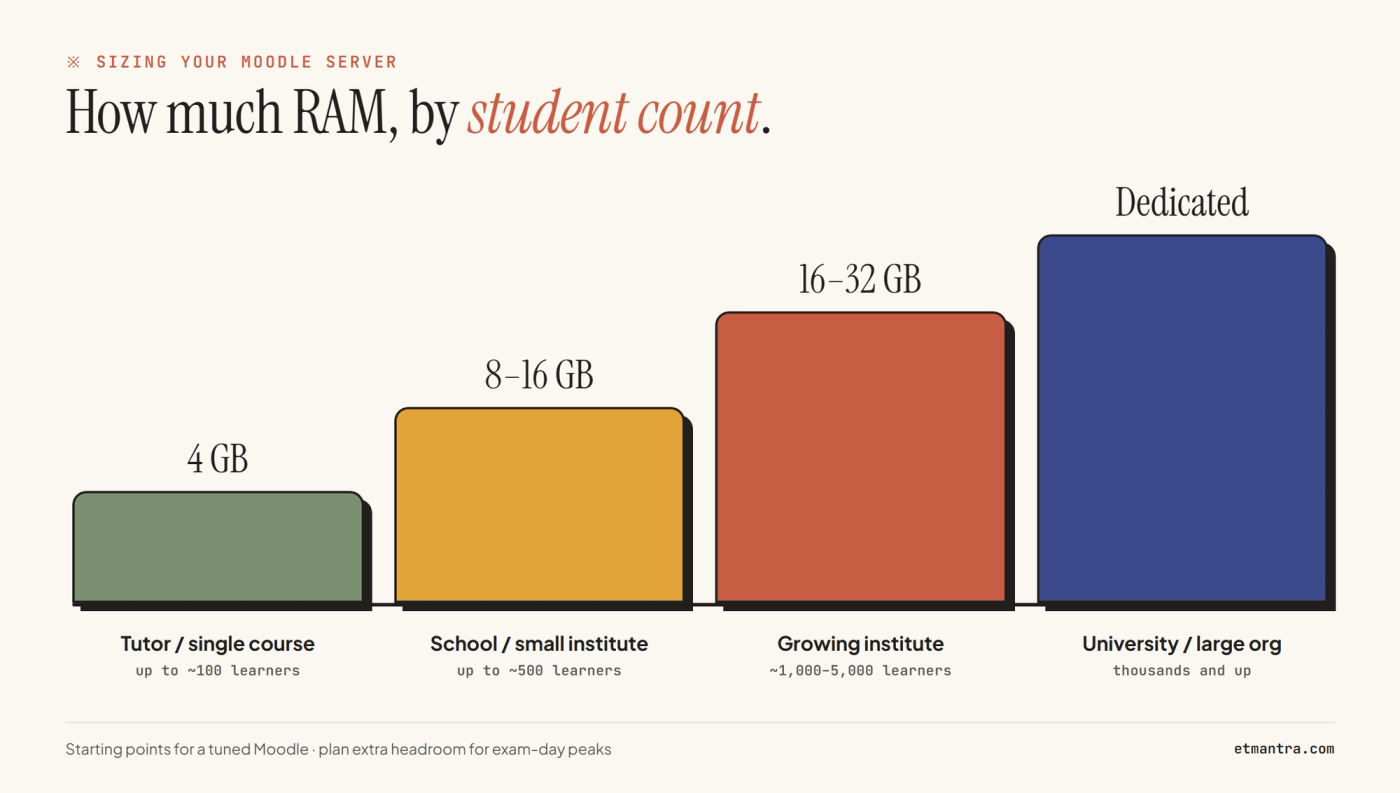
- Tutor / single course — up to ~100 learners: 4 GB RAM (the floor — never go below it), around 2 vCPU, 5–10 GB storage. Fine for one course and small, staggered quizzes.
- School / small institute — up to ~500 learners: 8–16 GB RAM, 2–4 vCPU, ~20 GB storage. Batch your exams where you can; move to 16 GB if a whole cohort sits a quiz at once.
- Growing institute / coaching — ~1,000 to 5,000 learners: 16–32 GB RAM, 4–6 vCPU, ~50 GB storage. Step RAM up through this band as concurrency and exam sizes grow.
- University / large org — thousands and up: a single VPS will struggle here. Move to a dedicated or multi-server setup with 8+ vCPU and custom RAM and storage.
The pattern is the one I always recommend: start at 4 GB minimum, and step up — 8, 16, 32 GB — as your student count and exam load grow. Don't over-buy on day one; scale with reality.
Storage: usually not the thing to worry about
People obsess over disk space. In practice, storage is rarely the bottleneck for Moodle — RAM and the database are, almost always.
The one exception is video. Video files are by far the biggest storage hog — but here's the key point: you should never host video on your Moodle server. Put your videos somewhere built for streaming and embed them in Moodle. For most institutions that means either YouTube (free, but public and with no protection) or a secure educational video hosting platform like VideoKavach when your course videos are paid content you want protected from piracy. Either way, the video storage and bandwidth never touch your Moodle server's resources, and your quiz performance stays unaffected. Do that, and storage stops being a problem you need to think about.
So the rule: your problem is RAM and database, not storage — and never upload your course videos onto the Moodle server itself.
The specs people forget
Hardware is only half the story. These get overlooked and then cause the "why is it slow / why did it break" problems:
- PHP version — Moodle is fussy about PHP; the wrong version means it won't run or runs badly.
- Database — MySQL vs MariaDB, correctly configured. This is where Moodle lives and dies.
- Caching — is Redis installed? Is OPcache enabled? These make an enormous difference to real-world speed, and a raw VPS won't have them set up.
- Backups — this is non-negotiable. If your server goes down for any reason, or an update breaks Moodle, and you have no backup — what do you tell your students the day before their exam? At an absolute minimum, you need backups that can restore yesterday's data.
None of these show up on a "how much RAM" spec sheet, but every one of them decides whether your Moodle actually works.
Right specs ≠ a Moodle-ready server
Here's the conclusion I want you to take away. You can buy a server with exactly the right specs and still end up with a slow, insecure, out-of-date Moodle. Specs are necessary, not sufficient.
A raw VPS is just an empty machine. To make it a Moodle-ready server you have to install and configure the whole stack, tune it (PHP-FPM, OPcache, Redis, the database) for Moodle's specific load, set up backups, apply security patches, and keep Moodle itself updated over time — in a way that doesn't break your existing courses and students. That's ongoing work, and it needs someone who knows Moodle, not just Linux.
That's the real reason institutions move to managed Moodle hosting: not to avoid buying specs, but so a partner sizes the server correctly, tunes it, scales it for your exams, backs it up, and keeps it patched — while you and your faculty spend your time on what actually matters, creating and teaching courses.
Quick answer (TL;DR)
- Never use shared hosting. Moodle is a heavy application, not a static website.
- Size for concurrent users, not total. ~10–15% of your students are active at once on a normal day.
- Exam day is the real test — everyone starts a quiz at once. Plan headroom, or use a host that scales RAM up for exams and back down after.
- Rough starting points: up to 100 learners → 4 GB RAM; up to 500 → 8–16 GB; 1,000–5,000 → 16–32 GB; thousands+ → dedicated.
- RAM and database are your bottleneck, not storage. Never host videos on the Moodle server — offload them.
- Don't forget the right PHP version, MySQL/MariaDB, Redis/OPcache, and reliable backups.
- Right specs alone aren't enough — a Moodle-ready server has to be tuned, secured, and maintained.
If sizing, tuning, and maintaining a Moodle server sounds like more than you want to take on, that's exactly what we do. ETmantra's Managed Moodle Hosting runs on India-based infrastructure, tuned for exam-day load, with backups and updates handled for you — and a 7-day free trial, no card required.