Set Maximum Scores Above 100 for Assignments in Moodle
Learn how to set maximum scores above 100 for Assignments in Moodle, allowing more flexibility in grading. If you’ve created an assignment and need to exceed the default 100 point limit for grading, this guide provides a step-by-step solution. Discover how to adjust the maximum score to 105, 110, or

Learn how to set maximum scores above 100 for Assignments in Moodle, allowing more flexibility in grading. If you’ve created an assignment and need to exceed the default 100 point limit for grading, this guide provides a step-by-step solution. Discover how to adjust the maximum score to 105, 110, or any custom value, ensuring accurate grading and evaluation of student performance.
Increase Grade Point Maximum Value
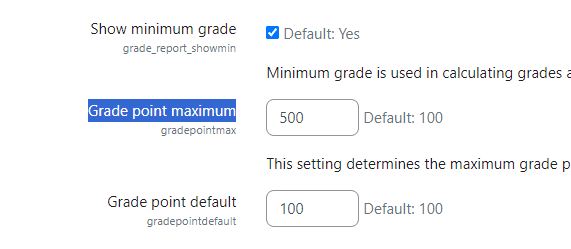
Visit Site Administration > Grades > General Settings
Search for “Grade point maximum” value on this page which is 100 by default. You can change it to any value. If you set it to 500 than you can create an assignment with any value up to 500.
Test in a Moodle assignment
You can test this by creating a new assignment or by editing an existing assignment and change its maximum grade to desired value.
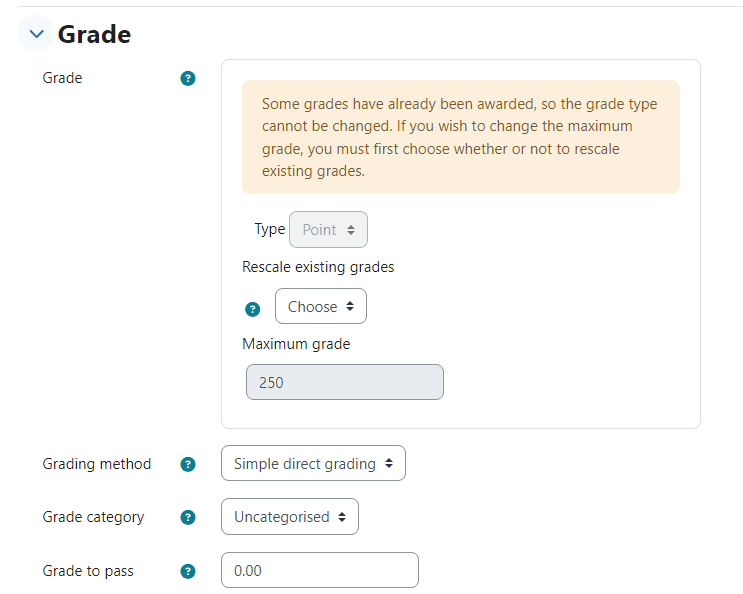
I hope now you will be able to Set Maximum Scores Above 100 for Assignments in Moodle.
Need help with your Moodle?
Need something more advanced on your Moodle — custom grading, a plugin, or a feature that isn’t built in? See our Moodle Plugin Development service, or tell us your requirement.
Related Moodle guides
Hide the first section of a Moodle course